
Smart SIM Registration 2025
Welcome to Your Smart SIM Registration Guide
Are you trying to register your Smart SIM card in the Philippines? You’re in the right place. This website provides everything you need to know—whether you’re registering online, through the Smart app, or at a physical store. We’ll walk you through the entire process, step-by-step, to make sure your SIM is properly registered and stays active. No complicated tech talk, just simple, helpful guidance.
What is Smart SIM Registration and Why is it Required?
Smart SIM registration is a government-mandated process in the Philippines that links your mobile number to your personal identity. The goal? To reduce scams, spam messages, and cybercrimes by ensuring that every SIM card is tied to a real person.
The SIM Registration Act (Republic Act No. 11934), which took effect in December 2022, requires all mobile users—both new and existing—to register their SIM cards. If you fail to register your SIM, it may be permanently deactivated, which means no calls, texts, or mobile data.
This guide is designed to help you understand the law, follow the registration steps, and avoid common mistakes. Whether you’re a local resident, an overseas Filipino worker, or helping a family member register, we’ve got you covered.
How to Register Your Smart SIM Card: Complete Guide
Registering your Smart SIM is easier than you think. There are three convenient ways to do it, depending on what works best for you:
Smart SIM Registration Online via Official Link
You can register your SIM quickly using Smart’s official online portal. Here’s how:
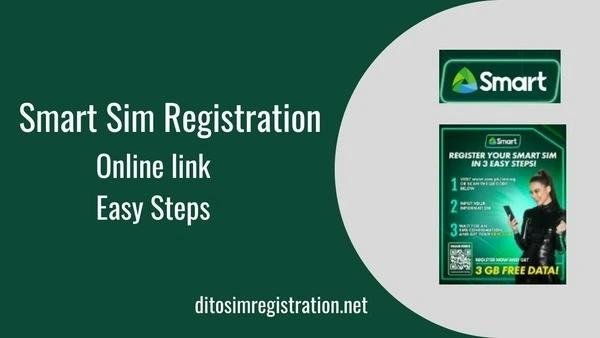
Steps to Register Online:
- Open the official SIM registration link.
- Enter your mobile number and click “Send OTP.”
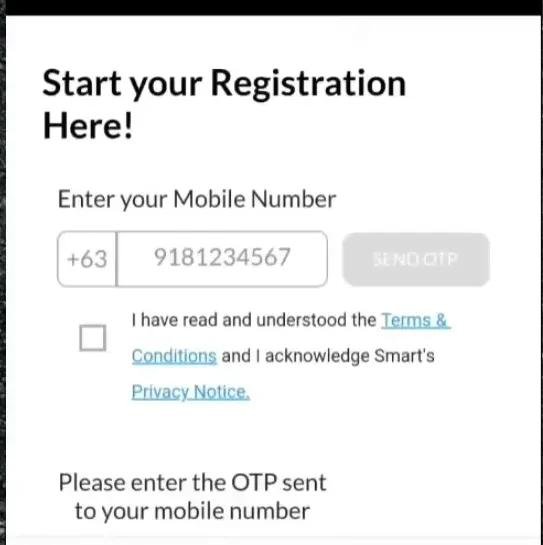
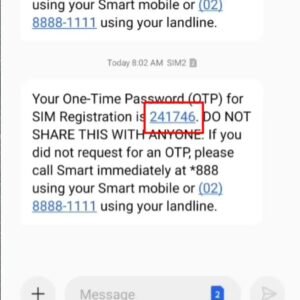
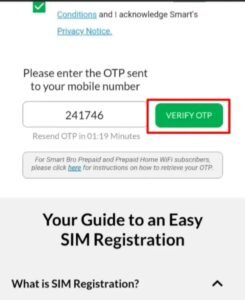
- Type in the OTP (One-Time Password) you receive.
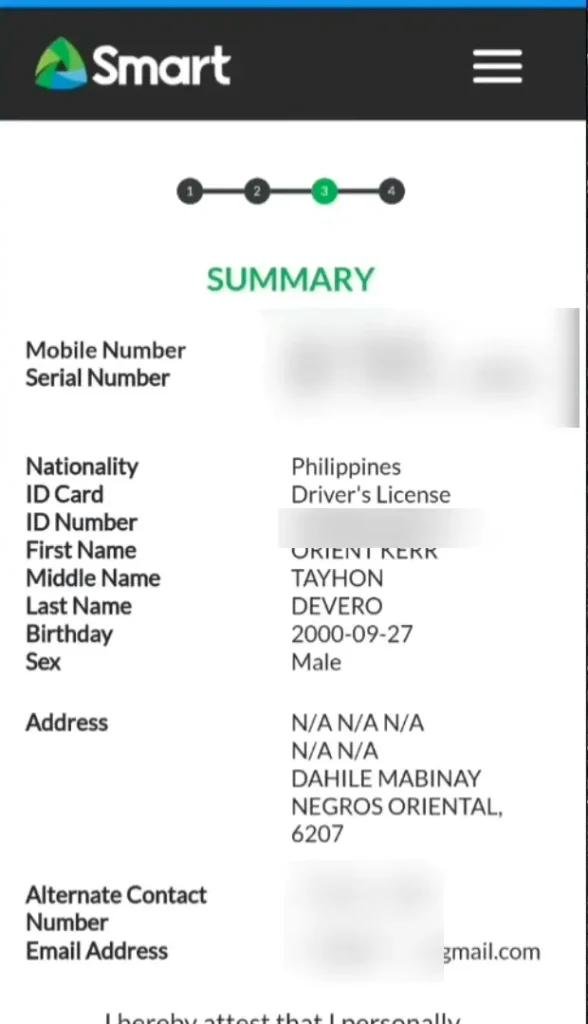
- Fill out your personal details:
- Full name
- Date of birth
- Sex
- Nationality
- ID type and ID number
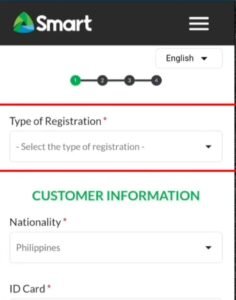
- Upload a clear photo of your valid government-issued ID.
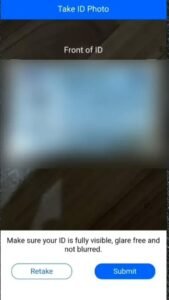

- Take a selfie for identity confirmation.
- Review the information and submit.
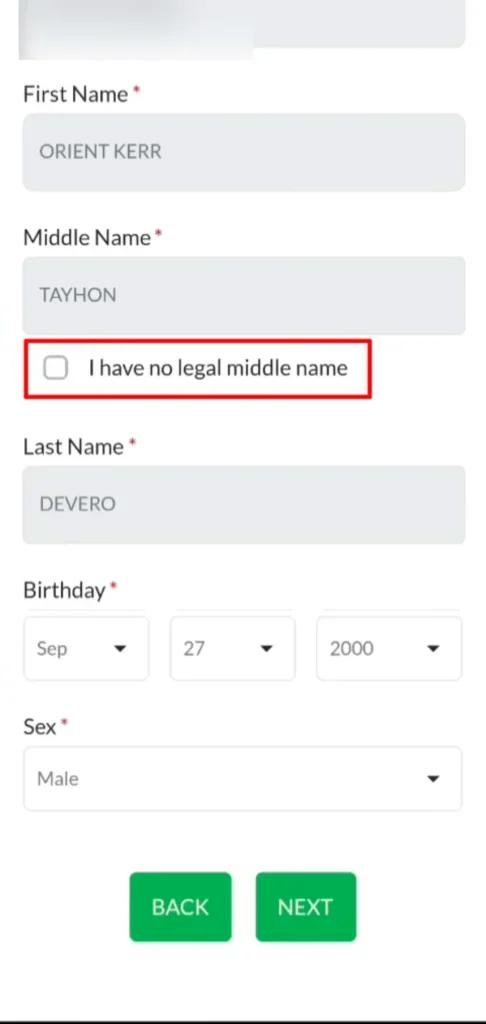
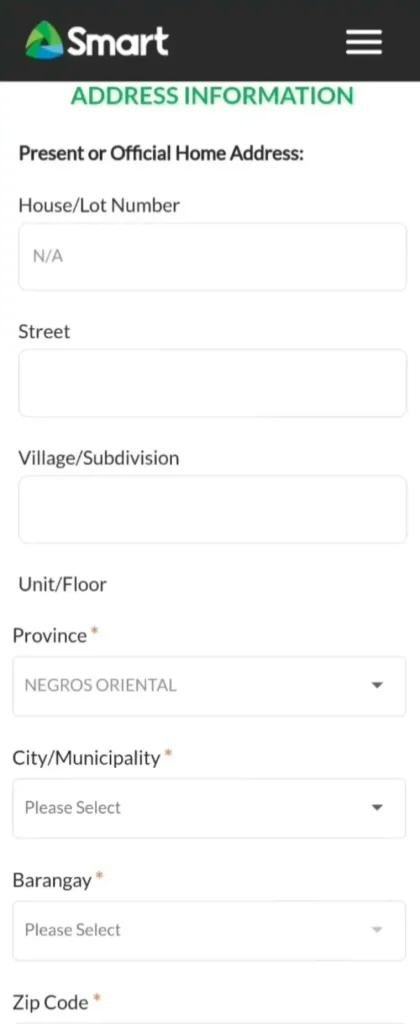
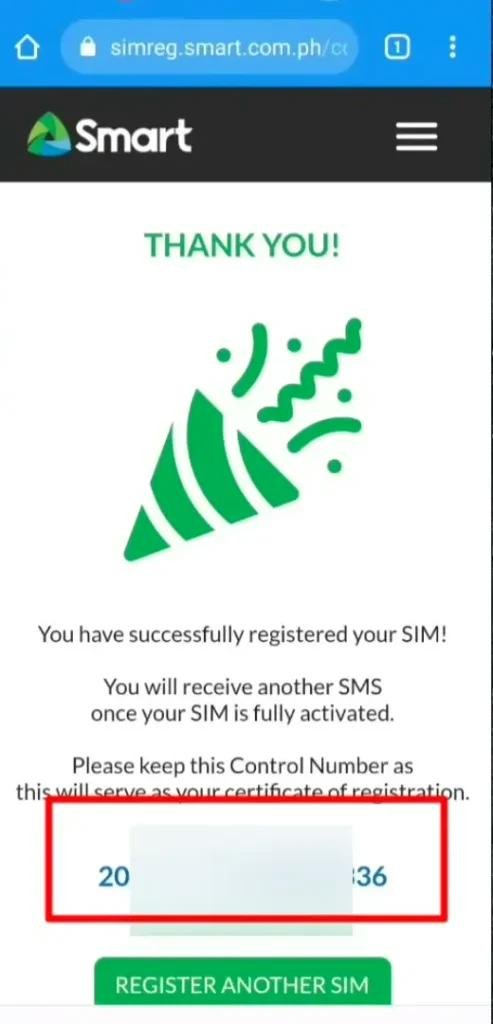
You’ll see a confirmation screen once your SIM is successfully registered.
Smart SIM Registration Through the Smart App
If you already use the Smart App, registration is just a few taps away.
Steps to Register via Smart App:
- Open or download the Smart App (available on Android/iOS).
- Log in with your mobile number.
- Tap the SIM Registration prompt on the home screen.
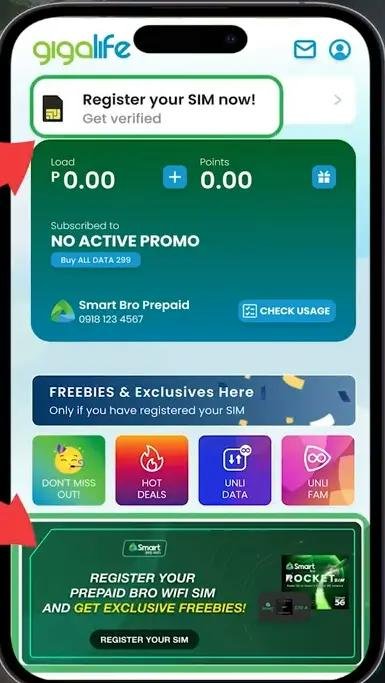
- Fill in your personal details.
- Upload your valid ID and take a selfie.
- Confirm and submit.
Make sure your app is updated to the latest version before registering.
How to Register Smart SIM Card at a Store or Retailer
Don’t have internet access? You can register your SIM in person at any Smart store or authorized retailer.
What to Bring:
- Your Smart SIM card
- A valid government-issued ID (e.g., passport, driver’s license, national ID)
- A working phone (if available)
The staff will help you complete the form and take your photo on the spot.
Important: Only choose one method of registration. If you’ve already registered online, you don’t need to do it again via app or store.
Smart SIM Registration Requirements & Deadlines
Before you begin the registration process, it’s important to prepare the necessary documents and be aware of key deadlines. This helps avoid delays and ensures your SIM remains active.
Required Information & Documents
To register your Smart SIM, make sure you have the following:
Personal Information:
- Full name (first, middle, last)
- Date of birth
- Gender
- Nationality
- Address
Valid Government-Issued ID (Any one of the following):
|
Accepted IDs for Registration |
|
Passport |
|
Philippine Identification (PhilID) |
|
Driver’s License |
|
SSS ID |
|
GSIS ID |
|
PRC ID |
|
Voter’s ID |
|
UMID |
|
Senior Citizen Card |
|
NBI Clearance |
|
Police Clearance |
Note: You will need to upload a clear photo of your ID and take a selfie for verification.
SIM Registration Deadline
The original deadline set by the Philippine government was April 26, 2023.
Extended Deadline: The registration period was extended until July 25, 2023 to give users more time.
If you fail to register by the final deadline, your SIM may be permanently deactivated. That means:
- No calls
- No texts
- No internet data
- No load or promo access
Quick Tips:
- Make sure your ID is not expired.
- Use a strong internet connection during online or app registration.
- If you’re under 18 or an OFW, there are different rules — we’ll cover that next.
Smart SIM Registration for Minors & OFWs
Not everyone registering a Smart SIM is a regular adult user. The Philippine government has provided special rules for minors and Overseas Filipino Workers (OFWs) to ensure they can also comply with the SIM Registration Act safely and properly.
Smart SIM Registration for Minors (Below 18 Years Old)
Minors are not allowed to register a SIM card in their own name. Instead, their SIM must be registered under a parent or legal guardian.
Requirements:
- Valid ID of the parent/guardian
- Consent form signed by the parent or guardian
- Proof of relationship (e.g., birth certificate)
How It Works:
- The parent or guardian must register the SIM using their own information.
- The SIM will be under their name until the minor turns 18.
- Once the user turns 18, they must re-register the SIM under their own name.
This ensures accountability while still allowing minors to use mobile services.
Smart SIM Registration for OFWs (Overseas Filipino Workers)
OFWs can also register their SIMs even if they are abroad. Smart has made it possible to complete registration online from outside the Philippines.
What You’ll Need:
- Philippine-issued Smart SIM card
- Valid government-issued ID
- A device with internet access (PC or mobile)
- A selfie (for identity verification)
Steps for OFWs:
- Visit https://simreg.smart.com.ph
- Enter your mobile number and request the OTP.
- Complete the form with your Philippine address and ID.
- Upload your ID and selfie.
- Submit and wait for confirmation.
If you no longer have your Philippine address, use your last known permanent address in the Philippines.
Important Notes:
- OFWs can only register Smart SIMs issued in the Philippines.
- Do not use someone else’s information just to register—this could result in SIM deactivation or legal issues.
SIM Registration Failed – What to Do If Your Smart SIM Registration Doesn’t Go Through
Sometimes, despite following all the steps, your Smart SIM registration may fail. Don’t panic — this is a common issue and can usually be fixed quickly.
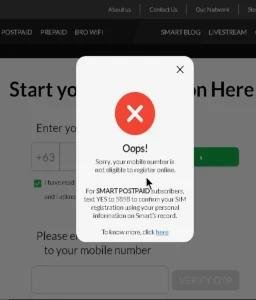
In this section, we’ll explain why SIM registration fails, how to fix it, and what to do if it keeps happening.
Common Reasons Why SIM Registration Fails
Here are the most common causes:
|
Reason |
Description |
|
❌ Invalid or Blurry ID Image |
The photo of your ID is unclear or doesn’t match the required format. |
|
❌ Incorrect Details Entered |
Your name, birthdate, or ID number may not match the ID. |
|
❌ Poor Internet Connection |
Unstable connection during form submission. |
|
❌ Multiple Failed Attempts |
Entering the wrong OTP or details multiple times. |
|
❌ Server Errors from Smart’s End |
High traffic or temporary maintenance on the SIM registration portal. |
How to Fix SIM Registration Failed Error
Follow these simple steps to try again successfully:
- Use a Strong Internet Connection
Preferably use Wi-Fi or strong mobile data. - Retake and Re-upload Your ID
- Make sure it’s clear, well-lit, and fully visible.
- Avoid blurry or cropped images.
- Double-Check Your Personal Information
- Ensure your name, birthday, and ID number match exactly with your uploaded ID.
- Clear Your Browser Cache or Use a Different Browser
Sometimes, browser issues can block form submission. - Wait and Try Again Later
If the Smart registration site is down, wait 10–15 minutes and try again.
Still Not Working?
If the issue continues, here’s what you can do:
- Call Smart Support: Dial *888# from your Smart number
- Visit a Smart Store: Bring your ID and SIM card
- Chat with Smart Live Support: Through https://www.smart.com.ph
Pro Tip: Always take a screenshot of the error message and your submitted form for easy reference when contacting support.
Sample Error Messages You May See:
- “Invalid ID Uploaded”
- “Registration Failed – Please Try Again”
- “Server Timeout”
- “OTP Not Valid or Expired”
Knowing the message helps you understand what went wrong.
How to Check Your Smart SIM Registration Status
After registering your Smart SIM, it’s important to confirm that your registration was successful. This ensures that your SIM will remain active and you can continue using all services like calling, texting, and mobile data.
How to Check SIM Registration Status (Online)
Smart has made it easy to verify your registration through their official portal.
Steps to Check:
- Go to: https://simreg.smart.com.ph
- Enter your Smart mobile number.
- Click on “Check Registration Status” (if available).
- Enter the OTP (One-Time Password) sent to your phone.
- You’ll see a confirmation message if your SIM is already registered.
If registered: You’ll see a success message or confirmation screen.
If not registered: You’ll be prompted to begin the registration process.
Can You Check via Smart App?
As of now, the Smart App may show a SIM registration banner or notification. If you don’t see the option, your SIM is most likely already registered.
Smart Customer Support (for Help):
|
Contact Method |
Details |
|
Smart Hotline |
Dial *888 from your Smart SIM |
|
Landline Support |
(02) 8888-1111 |
|
Smart Facebook Page | |
|
Smart Store Visit |
Nearest Smart store nationwide |
Final Tips:
- If you get “unregistered”, don’t worry — just complete the registration again.
- Keep a screenshot of your registration confirmation as proof.
How to Activate Your Smart SIM
If you just bought a new Smart SIM or recently registered one, you’ll need to activate it before you can use it for calls, texts, data, or registrations.
Activating a New Smart SIM (Step-by-Step)
When you insert your Smart SIM into your phone for the first time, it should activate automatically — but if it doesn’t, follow these simple steps:
Step-by-Step Activation Process:
- Insert the Smart SIM into your phone’s SIM tray.
- Turn on your phone.
- Wait for the signal bars to appear (look for “SMART” as the network).
- You’ll receive a welcome message from Smart.
If You Don’t Get the Welcome Message:
- Try the following:
- Restart your phone.
- Dial *123# to open the Smart menu — this triggers network recognition.
- Try sending a test SMS or making a call.
- Enable mobile data to check if the internet is working.
Already Registered but Not Working?
If you registered your SIM but it’s still inactive:
|
Problem |
Solution |
|
No signal |
Make sure SIM is inserted correctly |
|
No data or SMS service |
Dial *123#, restart phone |
|
SIM not recognized |
Try the SIM in a different phone |
|
Still not working |
Visit a Smart Store or call *888 |
Important Tips:
- Activation is usually instant once inserted and registered.
- Don’t forget to load your SIM to use calls, texts, and mobile data.
- If your SIM remains inactive for too long, it may be automatically deactivated.
That’s it! Your Smart SIM should now be ready to use.
Benefits of Smart SIM Registration
Registering your Smart SIM isn’t just about following government rules—it also comes with several practical benefits that protect you and improve your mobile experience.
Top Benefits of Registering Your Smart SIM
- Avoid SIM Deactivation
- Your SIM will remain active for calls, texts, data, and promos.
- Unregistered SIMs may be permanently deactivated after the deadline.
- Enhanced Security
- SIM registration links your number to your identity.
- Reduces chances of fraud, scams, and identity theft.
- Helps authorities track and block illegal use of mobile numbers.
- Access to Exclusive Promos
- Registered users may get exclusive Smart promos, bonus load, or data packages.
- You’ll stay updated via SMS alerts and the Smart app.
- Better Customer Support
- Registered SIMs make it easier for Smart to verify your account when you need help.
- Faster resolution for lost SIM replacement, account recovery, etc.
- Official Proof of SIM Ownership
- Registration serves as legal proof that the SIM belongs to you.
- Helpful in cases of lost phone, SIM swap requests, or number recovery.
Summary Table: Why Register?
|
Benefit |
Description |
|
SIM Protection |
Keeps your number active and in your control |
|
Identity Security |
Blocks fraud and misuse of unregistered SIMs |
|
Access to Smart Services |
Get full access to promos, load, and Smart rewards |
|
Fast Customer Support |
Easier verification for account help and SIM recovery |
|
Law Compliance |
Fulfills your obligation under the SIM Registration Act |
Good to know: You only need to register your SIM once (unless you change ownership). Keep your registration details safe for future reference.
Frequently Asked Questions (FAQs)
Conclusion – Final Thoughts on Smart SIM Registration
Registering your Smart SIM is more than just a government requirement — it’s a step toward safer, more secure, and more personalized mobile use in the Philippines.
Why It Matters:
- It protects you from fraud and scams.
- Keeps your SIM active and connected to Smart’s full services.
- Gives you access to promos, rewards, and customer support faster.
Whether you’re using your Smart SIM for personal, work, or business use — completing your SIM registration ensures uninterrupted service and helps build a safer mobile environment for everyone.
Quick Recap:
|
What You Need to Do |
Why It’s Important |
|
Register your SIM online |
Avoid deactivation |
|
Use a valid government ID |
Confirm your identity |
|
Check your status |
Make sure registration is complete |
|
Help others register |
Especially minors and elderly |
Final Tip:
If you haven’t registered yet, don’t wait. It only takes a few minutes via https://simreg.smart.com.ph. Need help? Visit your nearest Smart Store or call *888# from your Smart number.